

I wanted readers of SMaddikonda Writes to be able to leave a comment without creating an account. I also wanted to read every comment before it went live, and I wanted the conversation below an essay to feel like part of the same page. The blog could stay static. The conversation needed somewhere to go.
This is the first of two posts about the comment system I built. This one follows a comment from the reader’s browser to a private draft in a database, and then follows approved comments back to the page as threads. Part 2 follows a draft through a decision that changes what readers see.
What I looked at first
My requirements were short: no account for readers, nothing public until I approve it, a thread that looks like the rest of the blog, and no third-party script on my pages. I checked three existing options against them.
| Option | How it works | Where it fell short for me |
|---|---|---|
| Disqus | A hosted widget loaded into the page | A third-party script on every essay, with its branding and, on the free plan, its ads |
| Utterances and Giscus | Comments are stored as GitHub issues or discussions | Every commenter needs a GitHub account, and comments go live as soon as they are posted |
| Staticman | Each comment arrives as a file or pull request in the site’s repository | Publishing comments would tie them to my Git and deploy workflow |
Each of these is a reasonable product. None of them gave me a private queue in front of a thread I control completely. That pointed at a small API and a table, which for one blog is less work than it sounds.
The shape of it
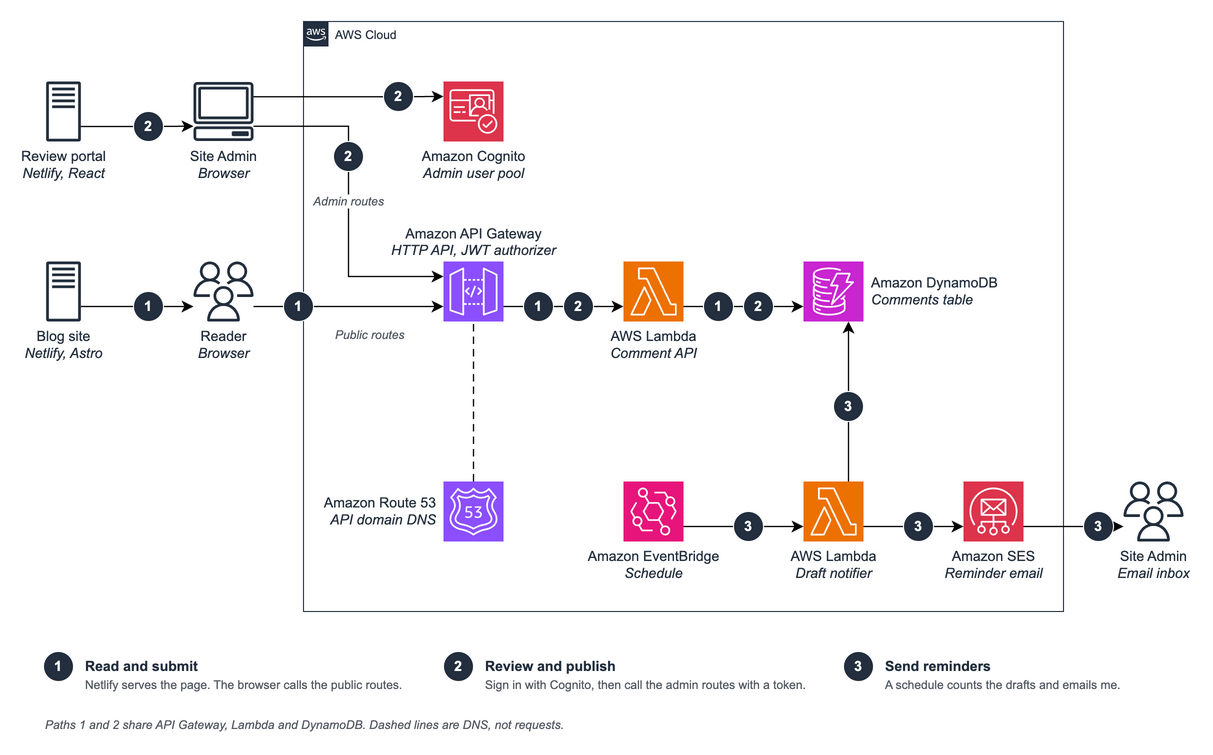
The blog stays static. The comment thread and the form are a React component that loads in the visitor’s browser and calls the API directly, after Netlify has served the page. One Lambda function behind an HTTP API in API Gateway handles every route, DynamoDB stores the comments, and Route 53 resolves the API’s domain names. Path 1 in the figure is the one this post follows.
Everything was set up by hand in the AWS console. For a project this small I didn’t want an infrastructure framework of its own to maintain.
The data model
A comment system asks its table the same three questions all day. I shaped the table around them.
| Question | How the table answers it |
|---|---|
| How many approved comments does this post have? | Each post has one extra item at SK = 0 that holds four counters: total, approved, draft and rejected. One key lookup reads it. Every change to a comment’s status updates the counters in the same transaction, so they stay in step with the comments. |
| What is waiting for me to review? | A secondary index on comment status, ordered by time, lists the drafts oldest first without reading any post’s partition. Only the review portal uses it. |
| How do I rebuild a thread? | A reply is an ordinary item with a parentCommentId. The API groups replies under their parents, and the browser builds the tree from the same links. |
The partition key is the post slug and the sort key is the comment’s timestamp in milliseconds, so all of a post’s comments sit in one partition. Here is the item:
interface CommentItem {
  PK: string;                 // post slug
  SK: number;                 // timestamp
  commentId: string;          // uuid
  parentCommentId: string | null;
  authorFirstName: string;
  authorLastName: string;
  authorEmail: string;
  authorWebsite: string | null;
  content: string;
  commentStatus: 'DRAFT' | 'APPROVED' | 'REJECTED';
  adminUpdateTimestamp?: number | null;
}
Nothing in the item records how deep a comment sits. Depth is worked out from the parent links when it is needed. The API treats the partition key as an opaque string, so notes and questions on the same blog reuse the table with a prefix such as note:the-yellow-revision. Adding a content type needed no backend change.
The public routes
The blog uses two routes, and neither needs a sign-in.
| Method | Path | Purpose |
|---|---|---|
| GET | /posts/{postId}/comments |
Approved comments for a post, as whole threads, 20 top-level comments per page, with a nextToken for more |
| POST | /posts/{postId}/comment |
Submit a comment or a reply. It is stored as DRAFT |
Posting a comment
A new comment never appears on its own. It is written with the status DRAFT and stays invisible until I approve it.
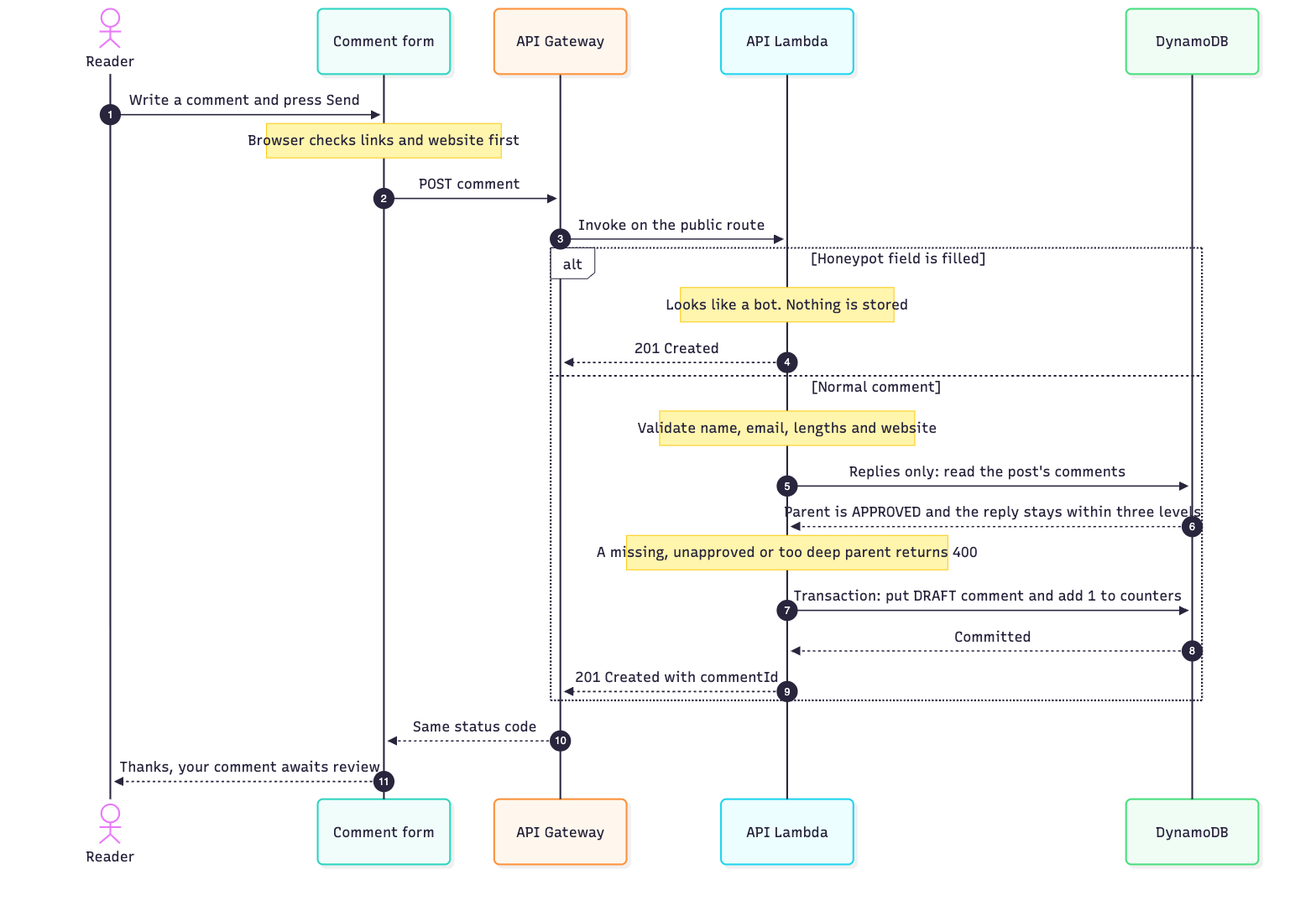
The write is one transaction, so the comment and the counter update succeed or fail together. A comment’s key is its timestamp, and two comments in the same millisecond would collide. The put refuses to overwrite an existing item, and the Lambda retries with the next millisecond, up to five attempts, before it gives up with a 500.
Threads go three levels deep. A thread is a comment, a reply to it, and a reply to that reply. No deeper. Three levels keep a conversation easy to follow on a phone, and they keep each thread small enough to return whole. The API enforces the limit when a reply is written. The parent must exist, be approved, belong to the same post, and sit no deeper than the second level. Depth is measured along the saved parent chain through comments of every status, so rejecting a comment later can’t make a thread deeper.
Reading comments
The obvious way to page comments is by time. Query the post newest first, keep the approved ones, return 50 and hand back DynamoDB’s cursor. It fails in two ways.
- Short pages. DynamoDB applies a query’s read limit before the filter, so a page can come back with fewer approved comments than it read, or none at all, while a cursor remains (the Query documentation says so).
- Split threads. This is the worse one. A reply is always newer than its parent, because replies are only allowed under approved comments. Newest first therefore puts a reply on an earlier page than the comment it answers. Until the parent’s page loads, the reply shows as a top-level comment, and when the page does load, it jumps under its parent. A reader who never loads that page never sees the connection.
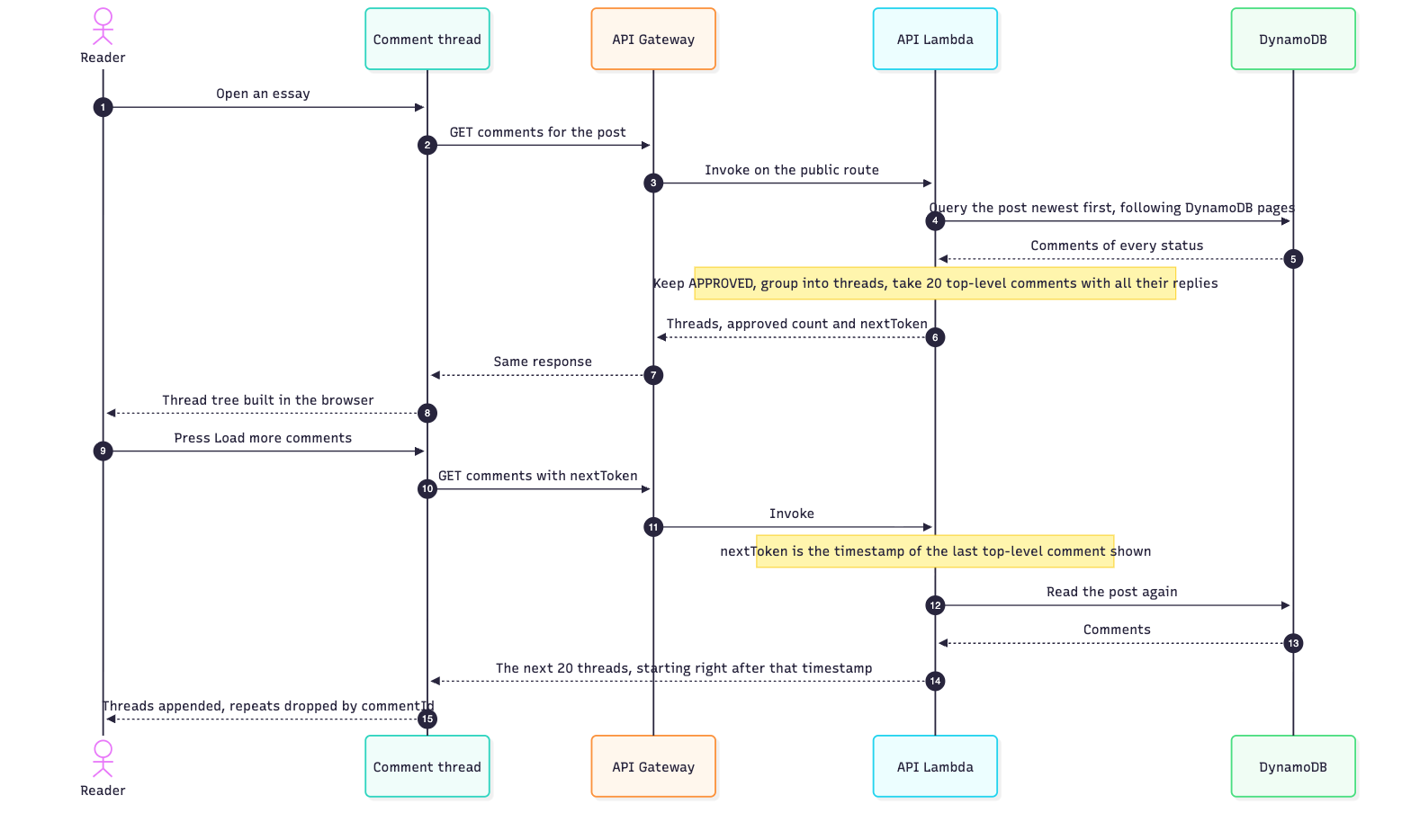
So a page is a set of whole threads. The handler reads the post’s partition with one query, about 1 KB per comment, following DynamoDB’s 1 MB result pages. It keeps the approved comments, groups them into threads, and returns the next 20 top-level comments, newest first, each followed by all of its replies. A reply is always on the same page as the comment it answers.
Take three top-level comments A, B and C, with one reply a1 under A and two replies c1 and c2 under C. Newest first, the comments run a1, c2, A, c1, B, C.
| Page 1 | Page 2 | |
|---|---|---|
| By time, 3 comments per page | a1, c2, A | c1, B, C |
| By thread, 2 top-level comments per page | A, a1, B | C, c1, c2 |
By time, c2 arrives without its parent C and has to move when page 2 loads. By thread, every page can be turned into a tree on its own, and nothing moves.
A few details make this hold up.
- The cursor is a timestamp, not an offset. It is the timestamp of the last top-level comment returned. New comments arrive above it, so loading the next page never repeats or skips a comment, even if someone comments in between.
- API and browser agree on what is top-level. A comment is top-level when it has no parent or its parent is not approved. The browser uses the same rule, so a reply whose parent was rejected is shown on its own on every page.
- Reads are bounded. Each request stops at 5,000 approved comments or 25,000 comments of any status, and it always reads newest first, so a cut drops the oldest comments. Spam drafts don’t count toward the first limit, so they can’t crowd real comments out.
- The count is computed, not trusted. The approved count in the response comes from the comments just read. The stored counter is the fallback only when a read was cut short.
Re-reading a post’s partition for every page costs a little more than following a cursor would. In return the table needs no extra index, and threads are assembled from the same items that every other route uses.
The blog keeps the cursor and shows a Load more comments button. Each page is merged into what is already loaded by commentId, and the tree is rebuilt in the browser. The thread renders three levels deep, with REPLY on the first two. If a thread ever holds a comment deeper than that, the blog shows it at the last level, right after the comment it answers, so nothing disappears.
REPLY needs one more rule. A reply whose parent was rejected is shown at the top, but in the saved chain it can still sit at depth 2, and the chain is what the API checks. Without a fix the blog would offer REPLY and the API would refuse it. So every comment in the response carries its saved depth, and the blog hides REPLY when either the displayed level or the saved depth has reached the limit.
What protects the public side
The two routes need no sign-in, so the API treats every request as untrusted. The form checks input too, but the browser is a convenience, not a boundary.
- CORS limited to the blog. API Gateway’s CORS policy for these routes allows only the blog’s origin, so a script on another website can’t call them from a visitor’s browser. Browsers enforce CORS, and curl or a server-side script ignores it, which is why every other check below still runs on the server.
- Validation on the server. The Lambda checks required fields, length limits (60 characters for names, 5,000 for the comment) and the shape of the email address.
- Websites are http(s) only. The optional website becomes a link under the commenter’s name, and a
javascript:value would turn that link into a script. The server accepts onlyhttpandhttps. A value that fails is dropped and the rest of the comment is kept. - Reader emails are visible only in the moderation portal. The public route leaves them out, and deleting a comment deletes the address with it. The server checks that the address looks like an email address. Nothing confirms it belongs to the commenter, so it is contact information the commenter chose to give, not proof of who wrote the comment.
- A honeypot field. The form has a field that readers never see. Bots tend to fill every field, and when it arrives with a value the Lambda answers with a normal success response and stores nothing.
- Replies only under approved comments, within three levels. The parent must exist, be approved, belong to the same post and sit within the depth limit.
- Plain-text rendering. React renders the thread as text. Nothing in the comment components injects raw HTML, so a comment containing markup shows up as characters.
- Quiet logs. The full request contains bearer tokens, emails and comment text, so the Lambda logs only the request ID, method and path.
- A two-link limit, in the browser only. The form refuses a comment with more than two links. That check does not run on the server, so it is a courtesy to honest readers and not a defence.
Where this leaves things
At this point a comment is a DRAFT item in DynamoDB. No reader can see it. Neither can I, unless I query the table in the AWS console.