

Part 1 ended with a draft comment in DynamoDB. This post follows that draft through one decision: I approve it, and it appears under the essay.
The review portal is a small React app, built with Vite and Tailwind and hosted on Netlify on its own subdomain. It shows me nothing until I sign in.
Signing in
The portal’s sign-in uses an Amazon Cognito user pool with self sign-up turned off, so only users I created can sign in. react-oidc-context sends me to Cognito’s hosted page and runs the authorization code flow with PKCE, then the portal sends the access token as a bearer token on every admin request. A 401 sends me back to sign in.
The API enforces this in two layers.
- The authorizer. The HTTP API has a JWT authorizer. It checks the token’s signature against the pool’s published keys, its issuer, its expiry, and that it was issued to my app client (AWS lists the full set of checks). A request to an admin route without a valid token never reaches my code.
- The admin check. A valid token proves the caller is a user of my pool. It does not prove they are a moderator. The Lambda compares the token’s
subclaim with a list in an environment variable,ADMIN_SUB, and returns 403 for anyone else. With the variable empty, nobody gets in.
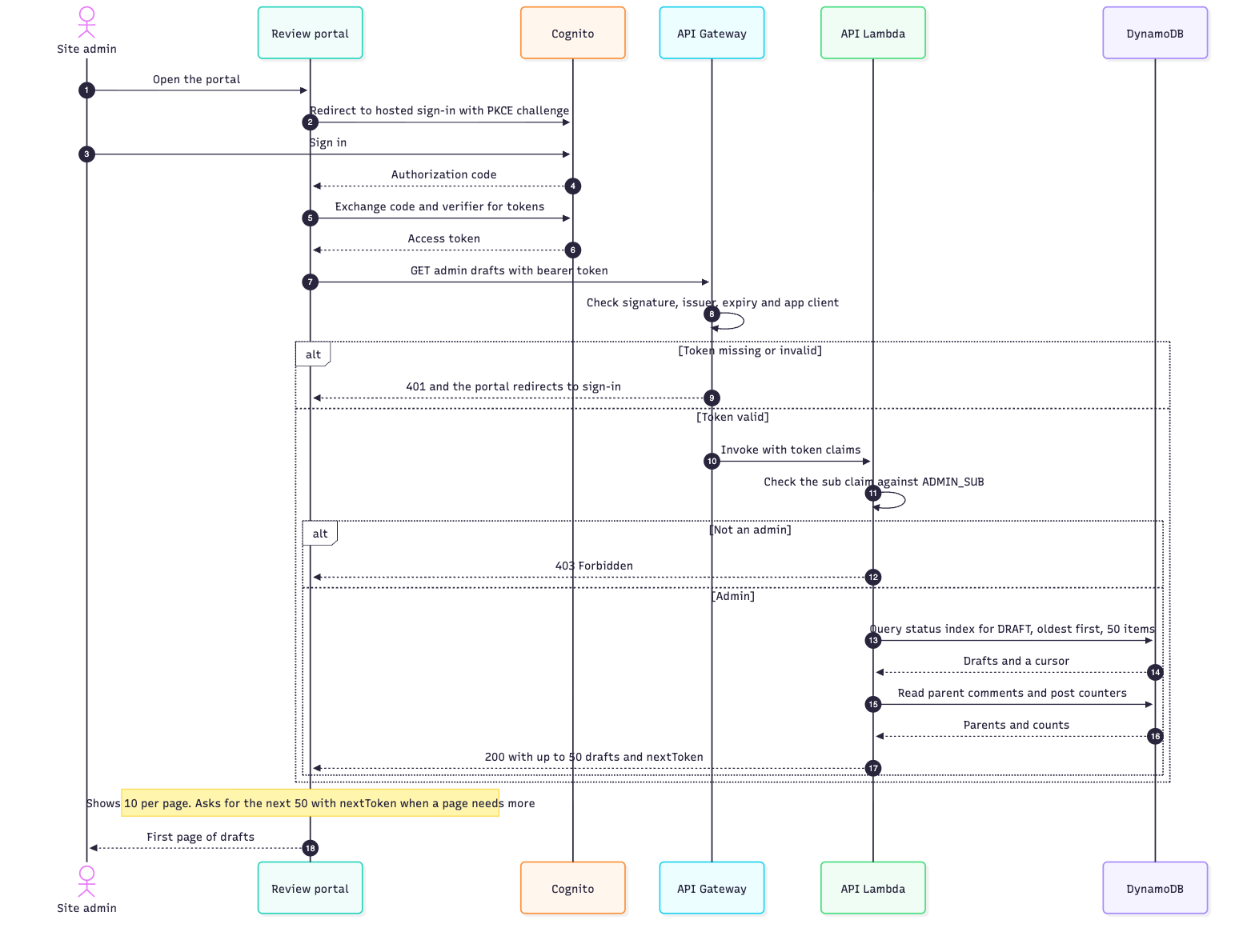
The API returns up to 50 drafts per request. The portal shows 10 per page and asks for the next 50 with the nextToken when a page needs more.
The portal calls four admin routes:
| Method | Path | Purpose |
|---|---|---|
| GET | /admin/comments/drafts |
Comments waiting for review, oldest first |
| GET | /admin/comments/reviewed |
Comments I have already decided on |
| PUT | /admin/posts/{postId}/comments/{commentId} |
Set a comment’s status to DRAFT, APPROVED or REJECTED |
| DELETE | /admin/comments/{commentId}?postId=...&sk=... |
Delete a comment, with cascade=true to include its replies |
The review queue
After sign-in the portal opens on the queue of drafts. The screenshot uses sample data.
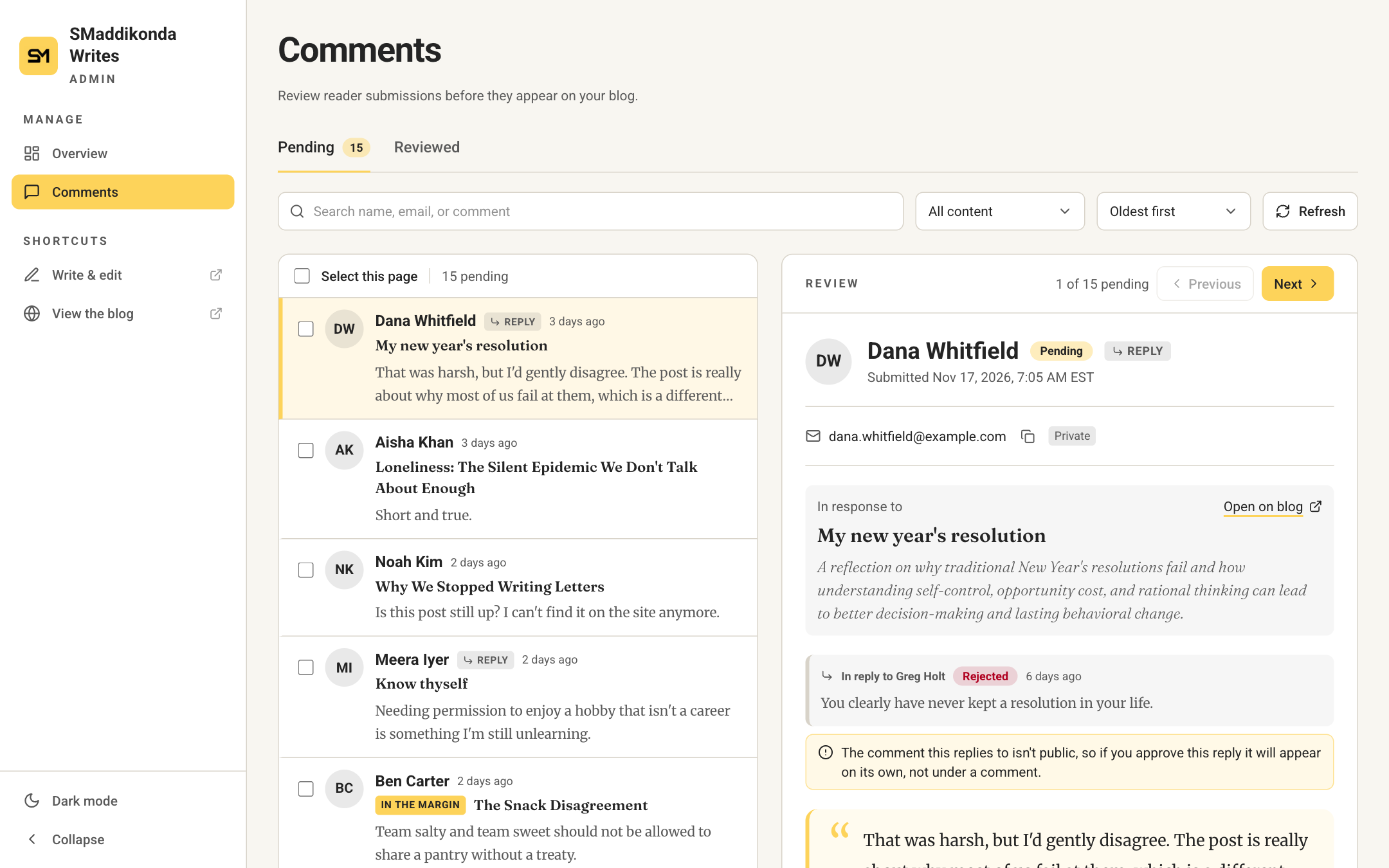
The queue lists drafts oldest first. Each row opens a review pane with the essay the comment belongs to, the comment it replies to, and the reader’s name, email and website. The email appears here and nowhere public. From the pane I can approve, reject or delete the comment.
Approving one comment
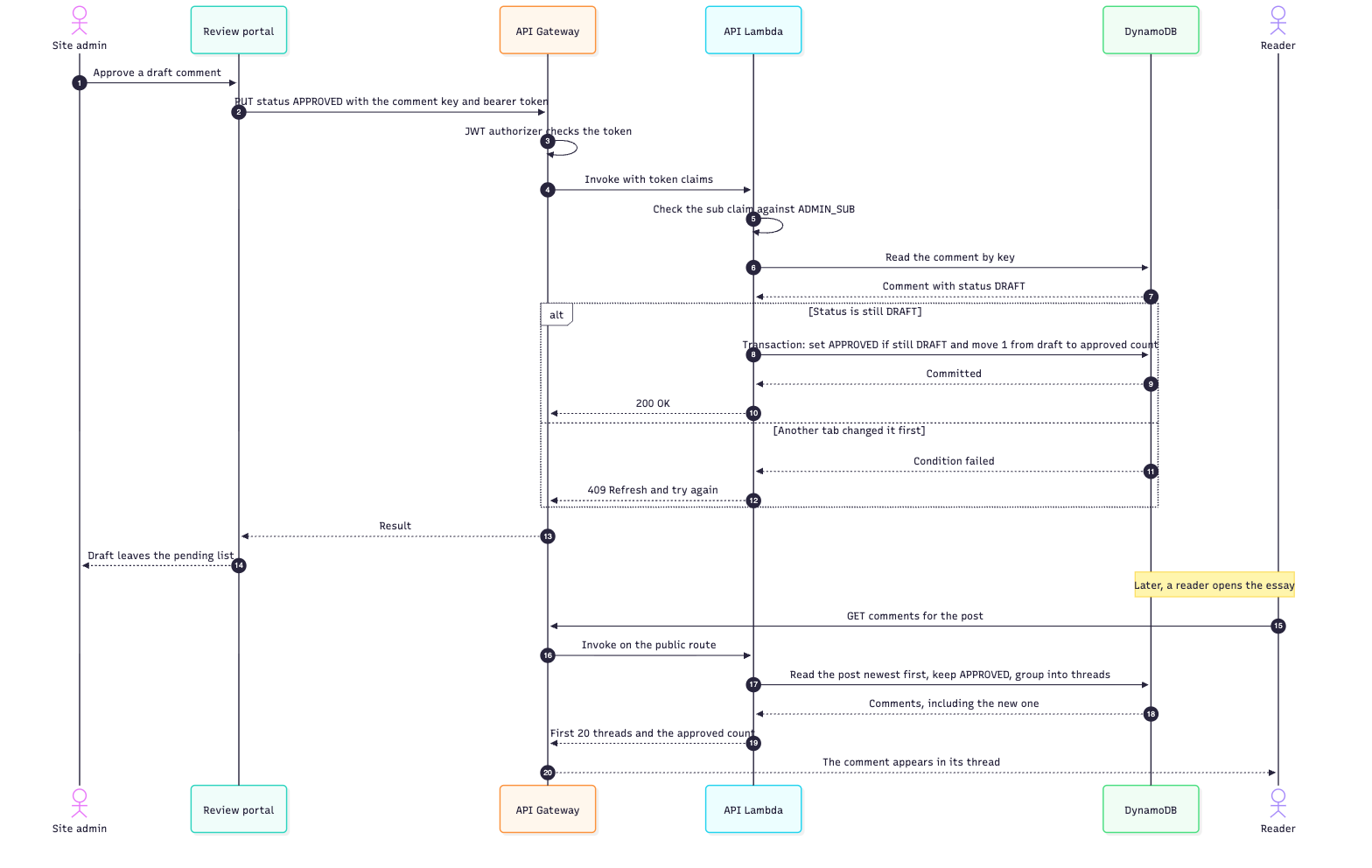
Approving is one request, PUT /admin/posts/{postId}/comments/{commentId}, with the new status and the comment’s sort key in the body. The Lambda reads the comment, then writes in one transaction. The transaction sets the status to APPROVED only if it still has the value the Lambda just read, and it moves one count from draft to approved on the post’s counter item. If another tab got there first, the condition fails, the Lambda returns 409 and the portal asks me to refresh.
The next time a reader loads the essay, the public route returns the comment inside its thread, and the approved count in the response is one higher.
Why the server reads the status itself
A tempting design lets the browser send the comment’s previous status along with the new one, and uses it to choose which counter to decrement. That works until two tabs disagree. Say tab A approves a draft, and tab B, which still shows it as a draft, rejects it. Tab B reports the old status as DRAFT, so the server takes one from the draft count a second time and adds one to rejected, while the approved count still includes a comment that is now rejected. Three counters are wrong, and nothing in the system notices.
So the route ignores any previous status the browser sends. It reads the status from the table and makes the write conditional on it. A lost race becomes a 409 and a refresh instead of a counter bug. If the counters ever do drift, a script recomputes them from the comments. It does a dry run unless I pass --apply.
Bulk actions
The portal can select the comments on a page and approve or reject them together. There is no bulk endpoint. It calls the single-comment route once per comment, one after another. Each call is its own transaction, and that is what keeps a comment’s status and its counters together. Running the calls in sequence only avoids contention, because parallel transactions on the same post would all touch the same counter item.
Because each call stands alone, a failure part way through does not undo the earlier ones. If the third of five fails, the portal keeps going, then reports how many succeeded and how many could not be updated, with the first error message. It stops early only when the sign-in session has expired, since the remaining calls would fail the same way.
What happens to replies
Threads are three levels deep: a comment, a reply, and a reply to that reply. Rejecting a comment does not touch its replies. They stay approved, and the blog builds each thread from the approved comments it receives. A reply whose parent is not approved is shown at the top as a standalone comment, and its own replies stay under it.
The portal says so before I confirm: “This comment has 2 replies. If you reject it, they will appear on the blog as standalone comments, not under this one.” The count covers direct replies, which are the comments that move. The review pane shows the same note on a pending reply, as in the screenshot: its parent was rejected, so it would appear on its own.
Delete is stricter. It is a hard delete, and it removes the commenter’s email with the comment. If the comment has replies at any depth, the API refuses with a 409 and a replyCount, and the portal asks whether to delete the replies too. Confirming sends cascade=true, and the API deletes the comment and all of its descendants in one transaction, with the counters adjusted by status. One request can delete up to 99 comments plus the counter update, which is DynamoDB’s limit of 100 actions per transaction.
One edge is not closed. The API checks that a parent is a valid target before it writes a reply, but the check and the write are separate steps. A reply that lands just as its parent is deleted stays a draft. The portal shows it as “In reply to a comment that no longer exists”, and if I approve it, it appears on its own.
Getting told about new comments
A moderation queue only helps if you notice it. A second, small Lambda runs on an EventBridge schedule. It counts the draft comments through the status index without returning their contents, following the cursor through every page so the number is the whole queue, and it emails me through Amazon SES when the count is above zero. A count query still reads the index entries it counts, so it uses read capacity (the Query documentation explains how capacity is calculated). If the run fails, the Lambda rethrows the error, so the failure shows up in its error metric instead of looking like a quiet day.
Is it worth building?
For me, yes. The whole backend is one Lambda with six routes and one table, and the portal is a handful of screens. I understand all of it and I can change any of it.
- No third-party branding or ads. There is no widget, tracker or extra script on the page.
- Full control of the look. The form and the thread use the blog’s own components, fonts and colours, in both themes.
- Readers need no account. A name, an email and a comment are enough.
- Moderation on my terms. Nothing shows up until I approve it, and I can delete anything.
- Data I own. The comments live in my own table, in a shape I chose.
The costs are real. You keep it patched and watch it, and you carry the security work that a hosted product would otherwise do. There is no CAPTCHA, and I haven’t added per-visitor rate limiting, so a determined spammer would take more than a honeypot to stop. If a comment section is not central to your site, a hosted option may be the better trade.
If you build one, keep the first version small: one table, two public routes, a status field and a way to approve. Everything else here was added because I wanted it.
The comment, live
Back to the comment in the screenshot. I approve it. The row leaves the pending list and the counters move. The next time a reader opens the essay, the comment is under it. Its parent was rejected, so it stands on its own, as the note in the review pane said it would.